Add product data to order confirmation email
This guide explains where to edit the order confirmation email in Shopify and how to download and use the prepared email template file.
Written By Floris de Vries
Last updated 7 months ago
Important: always create a backup
⚠️ Before making any changes, always create a copy of the existing email template.
Save the current template (for example in a text file or document) so you can always revert to the original version if needed.
Where to find the order confirmation email in Shopify
Log in to the Shopify Admin
Go to Settings
Click Notifications
Open Order confirmation
Click Edit code in the top-right corner
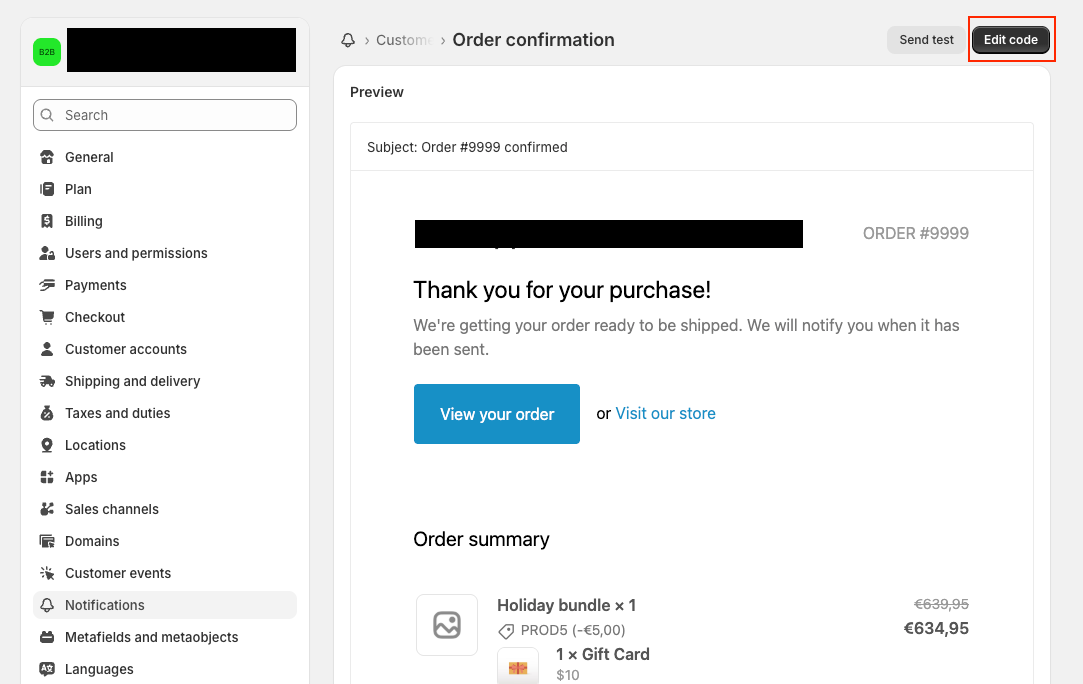
You will now see the HTML/Liquid template for the order confirmation email.
Using the template file
A ready-to-use email template file has been prepared with the product data already included.
How to use the file
Download the template file using the link below
Open the file.
Copy the entire contents of the file
Create a backup of the current template
Paste the new template code into the Order confirmation email template in Shopify
Click Save
Download
order confirmation template liquid code.docx
52.3 KB• Document
Testing
After saving:
Place a test order
Verify that all product data is displayed correctly in the email